smolpaw is a small lily58-based split keyboard on which it implemented a switchable steno/standard keyboard (the steno layer uses the geminipr protocol).
this started as a pet project from an extra unused lily58 PCB a friend had, which it made into a low-profile easy-to-transport build. it didn't really need a new split keyboard but decided to take it as an opportunity to learn stenography so the first iteration of its firmware was a basic pure stenography keyboard with little to nothing else added to it. recently though it's been travelling a lot and found itself wanting to extend this keyboard into something more versatile it could use when working or playing abroad.
the current iteration (v1.2)
the current iteration (v1.2) of that layout has its source available in this folder. it has a steno mode as well as a standard keyboard mode comprised of two layers. it doesn't have RGB or such fancy things but it does have an OLED screen it's using to show the active mode and for the steno mode it shows the last input chord (unordered for now). it also has a little therian symbol as header, both as a test of the OLED's capabilities and because it's fucking cool.
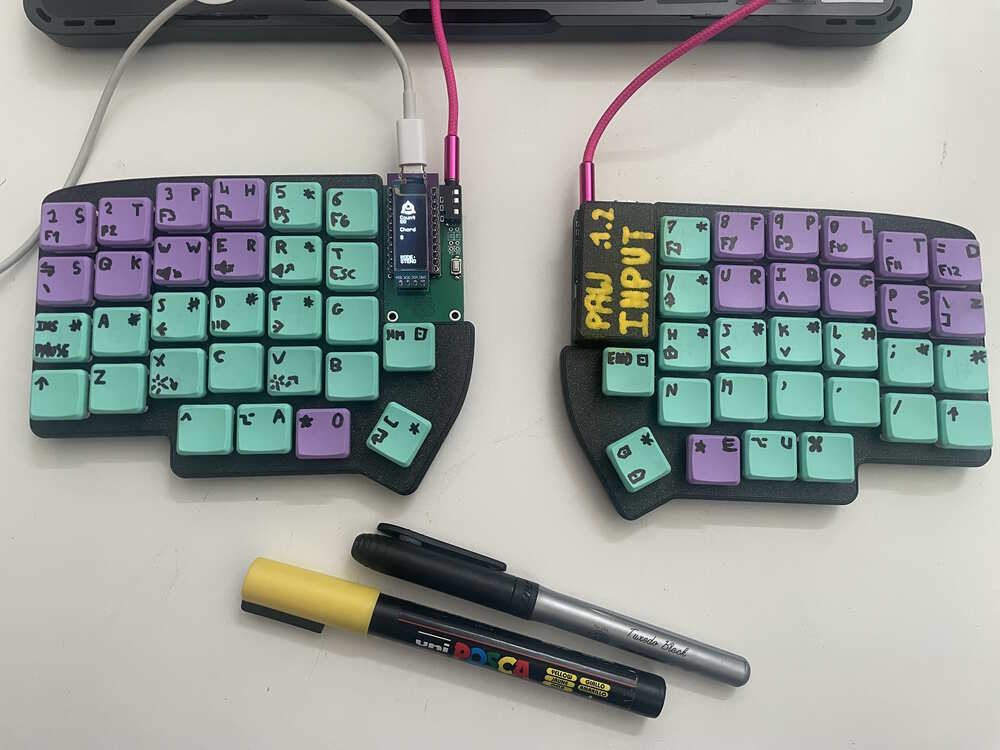
the input modes can be switched back and forth by pressing the combination of the HOME-END keys (when in steno mode, the physical keys that would enter HOME-END in the standard mode).
some implementation details
the whole firmware is built over QMK and uses some of its builtin features.
the mode switch input handling
for switching between steno and standard modes the aim was to have an easy-to-use switch that still wouldn't be tripped by accident. when thinking about how to solve this, the main idea was somehow to have a way to handle several keypresses together or a single specific key with an input duration.
QMK offers a built-in way to do the former through key combos.
this one decided to go for a two-key combo that would be easy to reach and remember: the inside "Home / End" keys. since each mode has vastly different keysets it had to make two separate combo events, one for each layer.
enum combo_events {
    SWITCH_TO_STD,
    SWITCH_TO_STENO,
};

const uint16_t PROGMEM layer_switch_to_std[] = {PB_1, PB_2, COMBO_END};
const uint16_t PROGMEM layer_switch_to_steno[] = {KC_HOME, KC_END, COMBO_END};

combo_t key_combos[] = {
    [SWITCH_TO_STD] = COMBO_ACTION(layer_switch_to_std),
    [SWITCH_TO_STENO] = COMBO_ACTION(layer_switch_to_steno),
};
additionally, since what's needed is not a simple keypress but is switching the core / active layer + doing some memory cleanup (in the case of steno) a custom event processor was implemented.
void switch_proto_layers(void) {
    if (layer_state_is(_STENO)) {
        layer_on(_STD);
        layer_off(_STENO);
        reset_chord();
    } else {
        layer_on(_STENO);
        layer_off(_STD);
        layer_off(_STD_M1);
    }
}

void process_combo_event(uint16_t idx, bool pressed) {
    switch (idx) {
        case SWITCH_TO_STD:
        case SWITCH_TO_STENO:
            if (pressed) {
                switch_proto_layers();
            }
            break;
    }
}
here, reset_chord(); is a display-specific memory cleanup method that will be documented in the display section.
the info display
to pilot the oled display, the oled library provides some functions and expects an implementation of a redraw fn named oled_task_user(void).
at its core, the render loop does two jobs: clearing the screen and rendering the current keyboard mode. for the latter, as it's rendering the mode at the bottom of the screen, it needs to know the max number of lines to specifically target the last two ones.
bool oled_task_user(void) {
    uint8_t max_lines = oled_max_lines();

    if (is_keyboard_master()) {
        oled_clear();

        // [...]

        oled_set_cursor(0, max_lines - 2);
        oled_write("MODE:", false);
        oled_set_cursor(0, max_lines - 1);
        if (layer_state_is(_STENO)) {
            oled_write("STENO", false);
        } else {
            oled_write("STD.", false);
        }
    }
    return false;
}
the therian symbol
the oled library provides support for rendering virtually any pixel blob and conveniently references a logo editor someone made. this one retrieved a black-and-white image of the therian symbol and uploaded it to this webbedsite to generate the proper bytes array needed to render it.
the render fn is then called in the render hook oled_task_user(void) where the core of the rendering is done.
bool oled_task_user(void) {
    uint8_t max_lines = oled_max_lines();

    if (is_keyboard_master()) {
        oled_clear();
        render_logo();

        // [...]
    }
    return false;
}
the stenography chord display
to help a bit while discovering stenography (and to experiment) it added a display showing the amount of chord keys being pressed as well as the actual notes.
the last pressed chord is stored in memory and read when doing an oled render frame, and it's obtained through the post_process_steno_user(...) hook.
a custom itoa to render the chord size was made for simplicity's sake.
void int8_toa(int8_t value, char *buf) {
    int8_t v = value > 0 ? value : -value;
    buf[0] = '0' + (v % 1000 / 100);
    buf[1] = '0' + (v % 100 / 10);
    buf[2] = '0' + (v % 10);
}

int8_t pressed_keys = 0;
char pressed_key_render_buf[4] = "000";
uint8_t last_chord[MAX_STROKE_SIZE];

bool post_process_steno_user(uint16_t keycode, keyrecord_t *record, steno_mode_t mode, uint8_t chord[MAX_STROKE_SIZE], int8_t n_pressed_keys) {
    pressed_keys = n_pressed_keys;
    int8_toa(pressed_keys, pressed_key_render_buf);
    memcpy(last_chord, chord, MAX_STROKE_SIZE);

    return true;
}
the notes aren't currently "properly" displayed (ie "in order") but this is still something planned for later.
const char* SYMBOL[48] = {
    "1", "Fn",  "#1",  "#2", "#3", "#4", "#5",   "#6",
    "0", "S", "S", "T", "K", "P", "W",   "H",
    "0", "R", "A",  "O", "*", "*", "res1", "res2",
    "0", "pwr", "*",  "*", "E", "U", "F",   "R",
    "0", "P",  "B", "L", "G", "T", "S",   "D",
    "0", "#7",  "#8",  "#9", "#A", "#B", "#C",   "Z"
};

void print_chord(uint8_t chord[MAX_STROKE_SIZE]) {
    for (size_t y = 0; y < 6; y++) {
        for (size_t x = 0; x < 8; x++) {
            if ((chord[y] >> x) & 1) {
                oled_write(SYMBOL[(8 * y) + (7 - x)], false);
            }
        }
    }
}

// oled section
void print_steno_display(void) {
    oled_write_ln("Count", false);
    oled_set_cursor(0, 5);
    oled_write_ln(1+pressed_key_render_buf, false);
    oled_advance_page(true);
    oled_write_ln("Chord", false);
    print_chord(last_chord);
}

bool oled_task_user(void) {
    uint8_t max_lines = oled_max_lines();

    if (is_keyboard_master()) {
        // [...]

        if (layer_state_is(_STENO)) {
            print_steno_display();
        }

        // [...]
    }
    return false;
}
when switching to standard, the memory is reset so switching back to steno again is back to a clean state.
void reset_chord(void) {
    for (uint8_t i; i < MAX_STROKE_SIZE; ++i) {
        last_chord[i] = 0;
    }
    pressed_keys = 0;
}
version history (as far as it can make it back)
1.0 - the beginning, sorta
the first layout was made in standard HDI keyboard protocol and using some "hello world" examples in-place. the goal was to have something kinda functioning before being able to start tinkering with it further.
it is covered in this "first steno" commit.
1.1 - proper steno protocol and display
the second iteration swapped the keyboard protocol keys for the steno protocol ones (using geminipr as protocol). it also added proper stuff on the OLED display, adding the therian logo as well as the currently/last pressed chord (the key series that was input).
it was done in multiple commits but this one fucked up the git history and had to rebuild it out of a patchset that resolved into a single patch commit.
1.2 - steno / standard modes and fancy lettering
in previous steno-only versions, some quick&dirty lettering job was done. this time, the lettering was more carefully planned and done layer by layer for best result (as shown in the image above).
a standard keyboard layer and its extra "mod" temporary layer for special symbols has been added, with a fancy two-key combo input used to toggle between both layers.
the display was reworked a bit to also include the currently active input mode, and for the standard keyboard "nothing more".
the version is tagged as v1.2.0 and its full source is available on this directory.